

Profile breakdown
What is inside a mobileconfig file, key by key, using a real MOFA profile.
A mobileconfig is a plist with a wrapper. The wrapper tells macOS what the profile is called and who made it. The payload inside carries the preference keys an app reads. Below is the 3-day forced update profile for Microsoft AutoUpdate, trimmed so the structure is easy to follow.
MOFA_mau_3day_update_v1.mobileconfigPayload type com.microsoft.autoupdate2Deadline 3 daysThe example file
<?xml version="1.0" encoding="UTF-8"?>
<!DOCTYPE plist PUBLIC "-//Apple//DTD PLIST 1.0//EN" "http://www.apple.com/DTDs/PropertyList-1.0.dtd">
<plist version="1.0">
<dict>
    <key>PayloadContent</key>
    <array>
        <dict>
            <!-- Per-app deadlines. Each entry is keyed by the app's install path. -->
            <key>Applications</key>
            <dict>
                <key>/Library/Application Support/Microsoft/MAU2.0/Microsoft AutoUpdate.app</key>
                <dict>
                    <key>Application ID</key>
                    <string>MSau04</string>
                    <key>UpdateDeadline.DaysBeforeForcedQuit</key>
                    <integer>3</integer>
                </dict>
                <key>/Applications/Microsoft Word.app</key>
                <dict>
                    <key>Application ID</key>
                    <string>MSWD2019</string>
                    <key>UpdateDeadline.DaysBeforeForcedQuit</key>
                    <integer>3</integer>
                </dict>
                <!-- Excel, PowerPoint, Outlook, OneNote, OneDrive, Teams and Defender follow the same pattern. -->
            </dict>

            <!-- Global AutoUpdate settings. -->
            <key>ChannelName</key>
            <string>Current</string>
            <key>HowToCheck</key>
            <string>AutomaticDownload</string>
            <key>UpdateCheckInterval</key>
            <integer>240</integer>
            <key>UpdateDeadline.StartAutomaticUpdates</key>
            <integer>3</integer>
            <key>UpdateDeadline.FinalCountDown</key>
            <integer>60</integer>

            <!-- Payload metadata. Every payload needs these. -->
            <key>PayloadType</key>
            <string>com.microsoft.autoupdate2</string>
            <key>PayloadDisplayName</key>
            <string>Microsoft AutoUpdate</string>
            <key>PayloadIdentifier</key>
            <string>com.microsoft.autoupdate2.3daypolicy</string>
            <key>PayloadUUID</key>
            <string>A1B2C3D4-3D3D-3D3D-1234567890CD</string>
            <key>PayloadVersion</key>
            <integer>1</integer>
        </dict>
    </array>

    <!-- Profile metadata. This is what shows in System Settings. -->
    <key>PayloadType</key>
    <string>Configuration</string>
    <key>PayloadDisplayName</key>
    <string>mau_3_day_force_update</string>
    <key>PayloadDescription</key>
    <string>Enforces a 3-day global forced update policy for Microsoft AutoUpdate.</string>
    <key>PayloadOrganization</key>
    <string>Cocolabs - MOFA</string>
    <key>PayloadIdentifier</key>
    <string>dev.cocolabs.mofa.3day</string>
    <key>PayloadUUID</key>
    <string>3DAY-UUID-GLOBAL-9876543210CD</string>
    <key>PayloadVersion</key>
    <integer>1</integer>
</dict>
</plist>
Trimmed for clarity. The full profile lists every Office app in the Applications dictionary. Each payload and the profile itself need their own PayloadUUID and PayloadIdentifier, and both must be unique on the device.
Key by key
The keys that do the work, with the units Microsoft documents for them. Each card links to the AutoUpdate preferences reference.
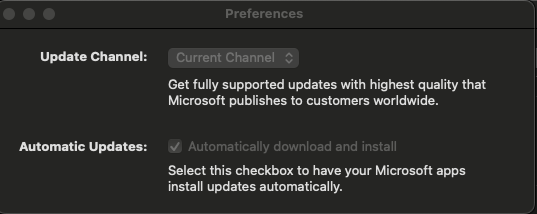
AutomaticDownload downloads and installs them. AutomaticCheck only checks, and Manual leaves it to the user. Setting this locks the choice in the AutoUpdate preferences.Current is production. Preview and Beta get builds earlier, and CurrentThrottle receives production builds on a slower rollout.240, four hours. Microsoft's default is 780 and they suggest a multiple of 60. The older UpdateCheckFrequency key is deprecated.Applications. The clock starts when the update is detected on that Mac, not when Microsoft releases it.60. Microsoft allows 10 to 720.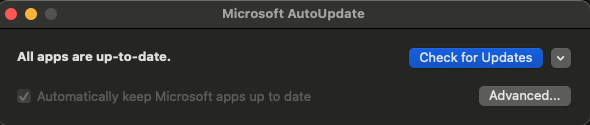
Make your own
An unsigned mobileconfig is plain text, so for a quick change open it in a text editor such as Visual Studio Code and edit the keys directly. To capture settings you have not written out yet, let the app do it for you.
~/Library/Preferences/ for the app's domain, for example com.microsoft.autoupdate2.plist. System-wide settings land in /Library/Preferences/.Tools
Further reading
Ready to deploy something? The profiles page has forced-update and privacy profiles you can upload as they are.